In this article:
- The mailing language
- Your contacts' language
- Setting up a different adresses for each language
- How to manage a multilingual mailing
The mailing language
The language selected for your mailing's footer determines two things:
- The footer displayed: all contacts in a given mailing receive the same footer, whether they are French-speaking or English-speaking.
- The automatic salutation variable: if you use a variable such as the Salutation (Monsieur/Madame or Mr./Ms.), it will appear in the mailing language.
Learn more about personalization variables >
Your contacts' language
The selected language in your contacts profile will help organize them and allow the system to interact in the right language when they click on the unsubscribe, send to a friend and confirm your consent links. You can also use this information to create distinct mailings depending on your contact's languages.
For example, if one of your English-speaking contact receives an email in French and click on the Unsubscribe link in the footer of your newsletter, the system will detect your his preferred language and the confirmation pages will appear in English.
Setting up a different adresses for each language
If your organization has separate contact information depending on the language — for example, an office in Montreal for French mailings and an office in Toronto for English mailings, you can configure a different footer for each.
To do so:
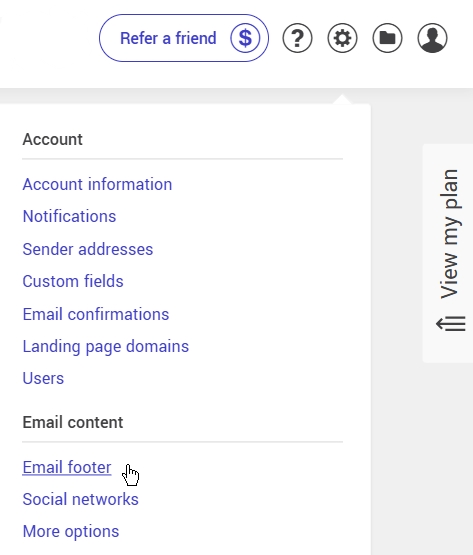
- Go to the Settings and configurations menu in the upper right corner of your account and select Mailing footer (under the Mailings and content section).
- Select the option Configure a different address for each language (French and English).
.jpg)
- Fill in the information for each language.
The footer will automatically display in the language corresponding to the mailing language.
If you wish to go back to a single address, simply check Use the same address for all languages.
How to manage a multilingual mailing
To provide the best experience for your subscribers, we recommend sending separate mailings by language:
- Create separate groups based on your contacts' language. You can use advanced search or dynamic groups to segment your contacts.
- Prepare a separate template for each language (e.g., one template in French and one in English).
- Select only the group that matches the mailing language at the time of sending. The language chosen for the mailing also determines which footer is displayed, if you have configured a different footer for each language.
If a bilingual mailing is unavoidable, here are your options:
- Include content in both languages directly in the email. Keep in mind that emails that are too long may be clipped by certain email clients such as Gmail, which could negatively affect your subscribers' experience and prevent open tracking from being detected.
- Write the email in one language and add a link to the online version of a previous mailing in the other language. To retrieve this link, you must first send your template in the other language to a small test group. We recommend not including a link to the online version in this test mailing to avoid any confusion. Note that clicks made in this online version will not be counted in your statistics.
- Use dynamic content blocks to automatically display the French or English version based on the contact's language. (Available with Plus and Pro plans.) Learn more about dynamic blocks >
Sending in a language other than French or English? The system only supports French and English for the footer and confirmation pages and emails. You will need to choose one of these two languages for your mailing. If you wish to include an unsubscribe link in another language, you can add it manually in the body of the email. Confirmation pages and emails will, however, display in French or English.